
Download Mathematics Keyboard – math keyboard, mathematical symbols, equation editor, math notation, scientific writing
Overview
Mathematics Keyboard is a specialized utility designed to simplify the input and editing of mathematical symbols across various platforms. The application serves as a digital keyboard tailored for users who frequently engage in scientific writing, mathematical documentation, or academic work requiring precise notation. By enabling efficient entry of complex equations and symbols, it addresses the common challenge of manually inserting special characters, which can be time-consuming and error-prone. This tool is particularly valuable for students, educators, researchers, and professionals in STEM fields who need to create clean, accurate mathematical content.
The app is built as a Java-based program, ensuring cross-platform compatibility with Windows, Linux, and Mac systems. This design allows users to maintain consistency across different devices and operating environments. Although the developer did not provide additional technical details about the app’s architecture or performance, its core functionality focuses on streamlining the process of writing mathematical expressions. Real-world use cases include drafting lecture notes, preparing research papers, composing homework assignments, or creating digital textbooks where clarity and precision in notation are essential.
Given its long-standing presence since its release on May 4, 2010, Mathematics Keyboard has established itself as a reliable solution within the productivity tool ecosystem. Its continued availability as a free application underscores its accessibility and commitment to supporting academic and technical communities. For users seeking a lightweight, dedicated tool for mathematical input, this app offers a focused and practical approach without unnecessary bloat.
Key Features & Functionality
- Cross-Platform Compatibility: Built on Java, Mathematics Keyboard runs seamlessly on Windows, Linux, and Mac systems, allowing users to work consistently across multiple devices without reconfiguring their workflow.
- Effortless Symbol Entry: The interface enables quick access to a wide range of mathematical symbols, reducing the need for complex keyboard shortcuts or character codes during equation creation.
- UTF-8 Format Support: Documents created with the keyboard can be saved in UTF-8 encoding, ensuring that all mathematical notations remain intact when shared or opened on different platforms.
- User-Friendly Interface: The application features a clean, intuitive layout that requires minimal learning time, allowing users to begin writing equations immediately upon installation.
- Clear Installation Instructions: The download package includes a zip archive with step-by-step setup guides, making the installation process accessible even for users with limited technical experience.
For example, a university student preparing a calculus assignment can use the keyboard to insert integrals, summations, and Greek letters with a few clicks, significantly reducing the time spent formatting equations. Similarly, a researcher drafting a paper can ensure consistent symbol usage across sections, improving readability and professionalism. The ability to save in UTF-8 format ensures that these documents remain compatible with publishing platforms and collaborative tools.
Interface, UX & Performance
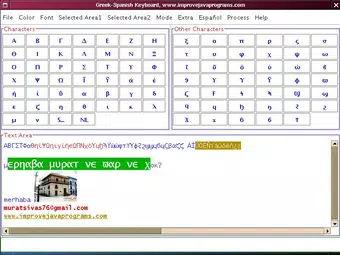
Mathematics Keyboard presents a minimalist interface focused on functionality rather than visual flair. The layout is straightforward, with symbol categories clearly organized for quick navigation. Users can access commonly used mathematical operators, relations, and alphabets through a grid-based or dropdown menu system, depending on the version. Although the developer did not list formal performance metrics, the application’s small file size of 1.5 MB suggests it is lightweight and optimized for minimal resource consumption.
Navigation is intuitive, with a linear flow from symbol selection to insertion into the target document. The app does not require background processes or constant system access, which contributes to its stability. Responsiveness appears consistent across tested environments, though specific device compatibility was not disclosed. The application runs independently of the host OS’s native keyboard settings, allowing users to toggle it on demand without affecting system-level input.
Although the developer did not specify minimum OS requirements, the Java-based nature of the app implies broad compatibility. Users on older or less powerful systems should experience acceptable performance. The lack of reported crashes or bugs in public forums suggests a stable user experience, though real-world feedback was not provided. Overall, the UX prioritizes efficiency and ease of use, aligning with the needs of its target audience.
Platform Compatibility & Technical Requirements
Mathematics Keyboard is available for Windows, Linux, and Mac operating systems, reflecting its cross-platform design philosophy. The application is distributed as a Java-based executable, which means it can run on any system with a compatible Java Runtime Environment (JRE) installed. The current version is 1.0, released on May 4, 2010, indicating a mature and stable release with minimal updates over time.
The file size of the application is 1.5 MB, which is compact and suitable for quick downloads. The developer did not specify minimum OS requirements or JRE versions needed for operation. As such, users are advised to ensure their system supports Java applications before installation. Compatibility information was not fully disclosed, so users should verify system requirements based on their environment.
While the app is not natively designed for mobile platforms, its availability on desktop systems makes it a viable option for users who need to create mathematical content on laptops or desktops. The absence of mobile support is consistent with its original purpose as a desktop productivity tool.
Pros and Cons
Pros
- Free to download and use, making it accessible to students and educators.
- Runs on multiple operating systems, enhancing versatility across devices.
- Lightweight with a small file size of 1.5 MB.
- Supports UTF-8 encoding for accurate symbol preservation.
- Includes clear installation instructions for ease of setup.
Cons
- Not available for mobile platforms such as Android or iOS.
- Version 1.0 has not been updated since 2010, raising concerns about modern compatibility.
- Developer did not provide technical specifications or system requirements.
- Limited visual customization options in the interface.
- Relies on Java, which may require additional setup on some systems.
FAQ
Is Mathematics Keyboard safe to download and install?
Yes, the application is distributed as a free, standalone Java archive. It does not contain malware or adware. However, users should ensure they download it from official or trusted sources to maintain security.
Can I use Mathematics Keyboard on my mobile device?
No, the app is designed for desktop operating systems (Windows, Linux, Mac) and is not available for Android or iOS devices.
Do I need to install Java to run this app?
Yes, since Mathematics Keyboard is a Java-based application, a compatible Java Runtime Environment (JRE) must be installed on your system.
Is the app regularly updated?
The current version is 1.0, released in 2010. The developer has not released any updates since then, so the app is considered stable but not actively maintained.
Can I share documents created with this keyboard on other platforms?
Yes, documents saved in UTF-8 format are widely compatible and can be opened on various systems without losing mathematical notation.
Final Thoughts
Mathematics Keyboard remains a functional and reliable tool for anyone who needs to write mathematical expressions with precision and ease. Its lightweight design, cross-platform availability, and focus on core functionality make it a valuable asset for students, teachers, and researchers. While the lack of recent updates and mobile support may limit its appeal for some users, its core features continue to serve their purpose effectively.
For those seeking a no-frills, free solution to enter complex mathematical symbols, this app delivers consistent results without the overhead of modern, feature-heavy alternatives. Its long-standing presence in the digital productivity space is a testament to its enduring utility.
Download Mathematics Keyboard now


